Latest News
High-Quality Video Coming To YouTube
Nov 15th, 2007 | By James Lewin | Category: Internet TV, Podcast Distribution  YouTube co-founder Steve Chen has confirmed that high-quality YouTube video streams are coming soon. The site is testing a player that detects the speed of the viewer’s Net connection and serves up higher-quality video if they want it.
Chen expects that high-quality YouTube vids will be available to everyone within three months.
Chen also confirmed that in YouTube’s internal archive, all video is stored at the native resolution in which it was sent in. However, he said, a large portion of YouTube videos are pretty poor quality to begin with — 320 x 240. Streaming them in high-quality mode isn’t going to help much.
via Webware
An Interview With The Creators Of Ask A Ninja
Nov 14th, 2007 | By Elisabeth Lewin | Category: How to Podcast, Internet TV, Making Money with Podcasts, The New Media Update, Video, Video Podcasts 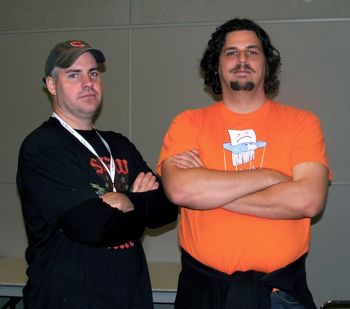
At the recent Podcast and Portable Media Expo, I had a chance to talk with Douglas Sarine (L) and Kent Nichols (R), the guys behind the viral video podcast hit Ask A Ninja.
I was suffering from laryngitis at the time – which meant that I spent most of the interview listening. It’s just as well – Douglas and Kent are so quick on their feet, and are hysterically funny. They also have a lot to say about how two guys with no money and a good idea can do something creative and get a worldwide audience.
Kent and Douglas talk about the genesis of Ask A Ninja; their new Ninja social network; the evolution of the podcast (while they’ve tweaked certain behind-the-scenes details, the program format has stayed the same throughout); the truth about pirates, clowns, robots and zombies; their “business model”; and their ideas on the future of indie media. And rapper battles. Really.
Kent Nichols is a candidate for the Advisory Board of the Association for Downloadable Media, elections for which are currently underway.
It’s Science! iPhone Not Great For Typing
Nov 14th, 2007 | By James Lewin | Category: iPods & Portable Media Players 
User Centric, a Chicago-based usability consultancy, has published a new study examining the usability of typing on Apple’s iPhone.
The study found that – hold onto something – typing on the iPhone isn’t as accurate as typing on QWERTY phones.
You’re More Than Twice As Likely To Type Something Stupid With An iPhone
When compared to hard-key QWERTY phone owners using their personal phones, iPhone owners’ rate of text entry on the iPhone was equally rapid. However, iPhone owners made more errors during text entry and also left significantly more errors in the completed messages:
- While iPhone owners made an average of 5.6 errors/message on their own phone, hard-key QWERTY owners made an average of 2.1 errors/message on their own phone.
- iPhone owners also left an average of 2.6 errors/completed message created on the iPhone, compared to an average of 0.8 errors/completed message left by hard-key QWERTY phone owners on their own phone.
“Despite the correction features available on the iPhone, this data suggests that people who have owned it for a month are still making about the same number of errors as the day they got it,” says Gavin Lew, Managing Director.
We’ve found that Apple’s error-correction seems to introduce almost as many errors as it fixes. Sometimes, iPhones even seem insistent on correcting things that you don’t want corrected.
Read more »
Universe Today Podcasting About Uranus
Nov 14th, 2007 | By Elisabeth Lewin | Category: Audio Podcasting, General  We live with a bunch of adolescents (and adolescents at heart), who also happen to be big fans of anything to do with space and astronomy.¬† But mention the ice planet Uranus at the dinner table (and pronounce it “your-anus” or “urine-us” depending on which syllable you accent), and at least four people dissolve into Beavis and Butthead-style snorts and giggles.
But the very thorough weekly podcast, Universe Today’s Astronomy Cast, is working their way through the solar system.¬† After a week on Saturn, then another week focused on Saturn’s many moons, this week the podcast turns its attention to Uranus.¬† And the very first item they get out of the way, is the snicker-inducing name of the planet (advice: there are many ways to pronounce it, but emphasize the first syllable (urine-us), and say it quickly to get it over with).
With that out of the way, the podcast talks about the astronomical history of how we came to see and understand the planet, and its unusual axis of rotation (sideways).¬† It’s a half-hour of interesting, science-based stuff — even without the adolescent entertainment.
Want to subscribe to the whole series? The feed is here.
The Levee Has Broken: Led Zeppelin Now On iTunes!
Nov 13th, 2007 | By James Lewin | Category: Digital Music 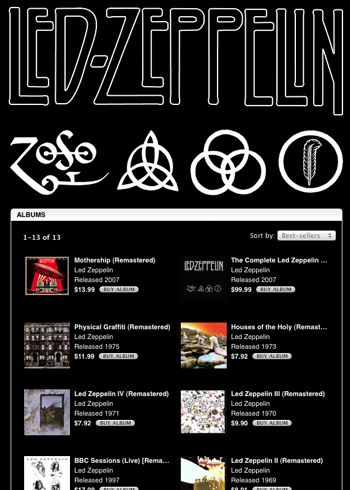
It’s been a long time since I rock and rolled…..but the wait is over.
Led Zeppelin are now available in iTunes – the complete mamajama collection, remastered. Each of Zep’s individual albums is available, or you can get everything for $99.
Check it out. (iTunes link)
We’re going to get the tracks off the one CD out of the Zeppelin boxed set that got ripped off from our car.
Favorite Zep track (at least today) – Baby I’m Gonna Leave You
Association For Downloadable Media Elections Begin
Nov 13th, 2007 | By Elisabeth Lewin | Category: General, Making Money with Podcasts  A note earlier today from Mark McCrery, who is helping shepherd the elections process at the nascent new media industry metrics/trade group, the Association For Downloadable Media (ADM), confirms that ADM elections are officially open now, and will continue through November 23, 2007 at 12:00 PM EST. There are over 45 nominees for twenty open seats on the board. In fact, there was so much interest in recommending additional nominees, the start of elections has been delayed several times.
Voting is open to all ADM members, and their ballots will decide the four Executive Board positions (President, Vice President, Secretary, Treasurer), five committee chairs (Advertising Standards, Education and Outreach, Measurement, Membership, and Terminology Standardization), and eleven Advisory Board members. You can see the list of nominees here, and you can read biographies for the nominees* if you click on the open position or category.
McCrery’s note says that “the communications team will develop a strategy for announcing the winners internally and to the press.”
You know we’ll keep you posted.
Read more »
Advertising as We Know It Is Dead
Nov 13th, 2007 | By James Lewin | Category: Making Money with Podcasts  IBM says that advertising as we know it is dead – most of us just haven’t realized it yet.
IBM’s report, The End of Advertising as We Know It, forecasts greater disruption for the advertising industry in the next five years than occurred in the previous 50.
IBM surveyed more than 2,400 consumers and 80 advertising executives globally. They found that:
- Increasingly empowered consumers, more self-reliant advertisers and evolving technologies are redefining how advertising is sold, created, consumed and tracked.
- Traditional advertising players risk major revenue declines, as budgets shift rapidly to new, interactive formats.
- Interactive advertising is expected to grow at nearly five times that of traditional advertising.
“Digital entertainment is experiencing faster adoption than anyone had previously anticipated. The advertising community needs to dramatically re-orient its business to serve consumers who increasingly access content in non-linear formats,” said Bill Battino, Communications Sector managing partner, IBM Global Business Services. “Companies must re-look at how they serve content to consumers with business models based much more on engaging consumers in a relationship.”
Read more »
Exclusive Interview With Microsoft Zune Podcast Guru Rob Greenlee
Nov 13th, 2007 | By Elisabeth Lewin | Category: Audio Podcasting, iPods & Portable Media Players, The New Media Update  We, along with a lot of people in the podcasting community, were excited to hear recently that Microsoft had hired Rob Greenlee to be its Podcast Programming & Marketing Lead for the Microsoft Zune.
Rob was doing Internet radio long before podcasting was created. Rob, along with his wife Dana Greenlee, hosted WebTalk Radio, an internationally syndicated radio show, webcast and podcast. Rob also helped pioneer the world of mobile podcasting as the Senior Marketing Manager for Melodeo.
And he’s got a Guinness World Record for his role in making the world’s largest glass of orange juice.
I caught up with Rob at last week’s BlogWorld Expo and talked with him about the new Zunes, Microsoft’s new podcast directory and more.
(Photo at right of Rob Greenlee and Podcasting News‘ Publisher, Elisabeth McLaury Lewin, at the South By Southwest Interactive conference, March 2006)
Update Your Zune & Get Some Podcasts!
Nov 13th, 2007 | By James Lewin | Category: iPods & Portable Media PlayersMicrosoft has published the info on updating first-generation Zunes to the latest software – the software that finally supports podcasts and even lets you sync wirelessly.
The current version of the Zune device software is version 2.1. This version includes the latest enhancement and all past enhancements. To view the details about the enhancements, see the following table.
Updating Your Zune Software
To install the current Zune device software, follow these steps:
- If you are a new Zune customer, install the Zune software that was included with the Zune device or visit http://www.zune.net/setup to obtain and install the software. If you are an existing customer, update the Zune software by clicking Help on the Options menu and then by clicking Check for Updates. If you do not see the Options menu, you already have the current version installed.
- Connect the Zune device to a Windows-based computer by using the Zune sync cable. Use a USB port on the back of the computer. Do not use a USB hub.
Note: If the battery in the Zune device is critically low, we recommend that you charge your Zune device before you continue. For more information about how to charge your Zune device, click the following article number to view the article in the Microsoft Knowledge Base:
927348 How to charge the battery in your Zune device - Open the Zune software while the Zune device is still connected to the computer. The Zune software searches the Internet for the latest version of the firmware. If a newer version of the Zune firmware is available than the version that you have installed, a notice to update your device appears. You can also manually check for new device updates by clicking Settings, by clicking device, and then by clicking Device Update. If an update is available, click Install.
Important: Do not move or disconnect the Zune device until the update is complete. The update may take several minutes. During this time, the Zune device may restart several times.
The Video Guide To The New Zunes
Nov 13th, 2007 | By James Lewin | Category: iPods & Portable Media Players Here’s a collection of Zune videos that introduce the Zune and highlight its features.
Microsoft Zune Team Intros The Zune 2
More videos below, including Bill Gates pimping the Zune, unboxing walkthroughs and video overviews of second generation Zune features…
Read more »
